How DNS Resolution Works
Inside DNS Resolution: Root, TLD, and the Path to an IP
What is DNS, and why do we need name resolution?
DNS is our internet’s phonebook. But there is one important difference. It never stores names and numbers in one place.
We humans prefer names like “google.com“. But computers only understand IP addresses (142.250.19.46). DNS exist to translate between the two, quickly and reliable, millions times per second.
Without DNS every website we build or visit would require use to remember raw IP addresses which is practically not possible. That’s why internet world relies on DNS where responsibility is split across multiple layers instead of one central database.
Isi design decision ki wajah se, agar internet ka koi hissa fail bhi ho jaaye, phir bhi poora internet chalna band nahi hota.
What is the dig command and when it is used
dig —> Domain Information Groper —> is a diagnostic tool that lets us see DNS in action.
What happens normally? When we open a website in the browser, we don't see the entire DNS process. Browser handles everything in the background. It hides the DNS resolution process.dig removes that abstraction and shows exactly what was happening.
which servers are being queried
what records are returned
how authority flows through the system
Matlab, DNS ke andar jo actual baat-cheet ho rahi hoti hai, dig woh sab saamne dikha deta hai.
difference between cURL and dig?
—> curl = HTTP ke liye
—> dig = DNS ke liye
Jaise cURL batata hai server se kya response aa raha hai, dig batata hai DNS ke andar kya ho raha hai.
dig = DNS ka X-ray machine
digworks natively on Linux and macOS. On Windows, it does not come by default in Command Prompt, PowerShell or in Windows Terminal. If we install Windows Subsystem for Linux (WSL), we get a real Linux environment inside Windows.
DNS resolution happens in layers
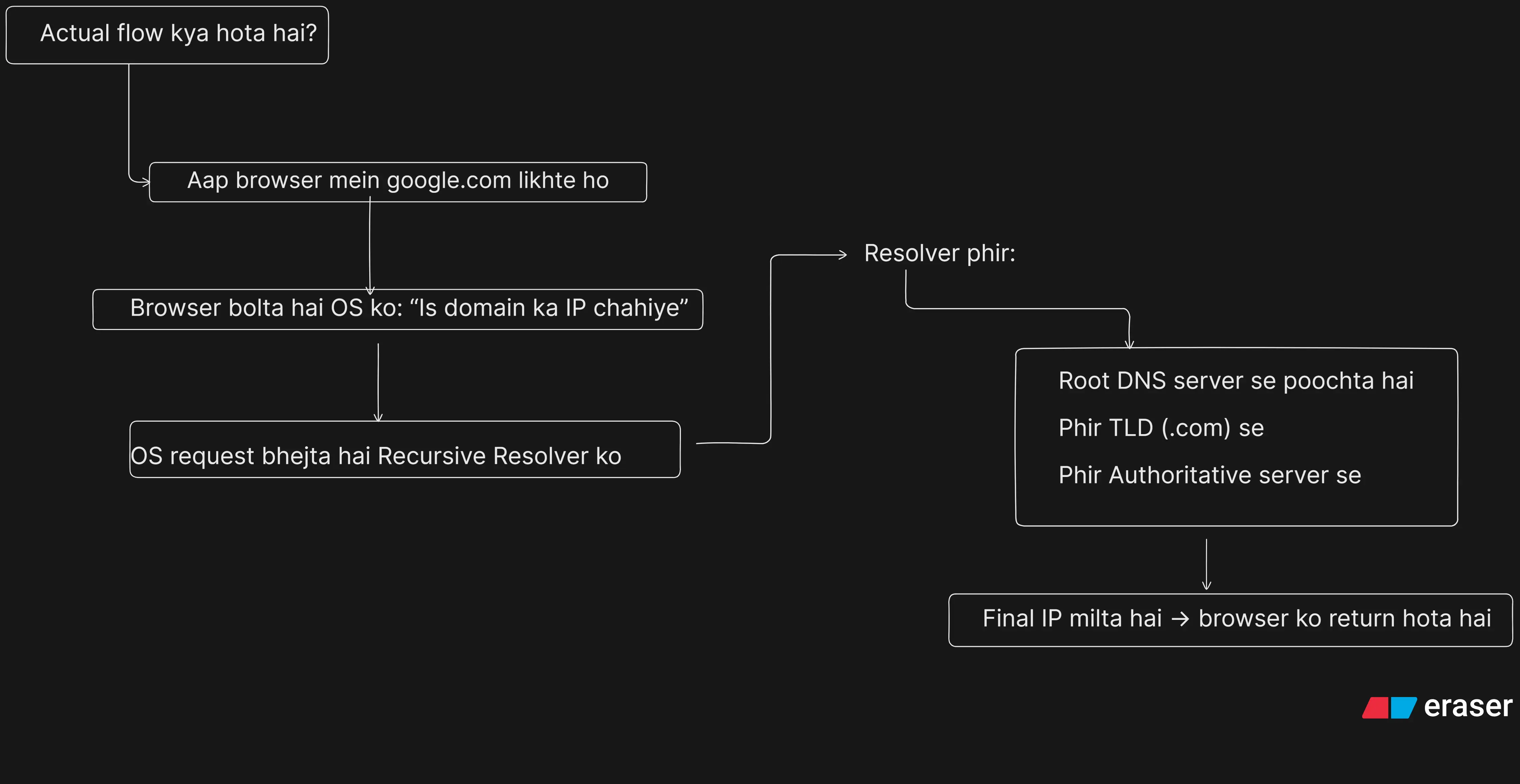
DNS resolution doesn’t give the answer in one go. It finds the answer by moving step by step through different levels.
Pehle root level se poochta hai,
phir TLD (.com, .in, etc.) ke paas jaata hai,
aur finally authoritative DNS server se exact answer leta hai.
Isliye DNS ka process thoda slow lag sakta hai,
par yehi step-by-step design system ko reliable aur stable banata hai.
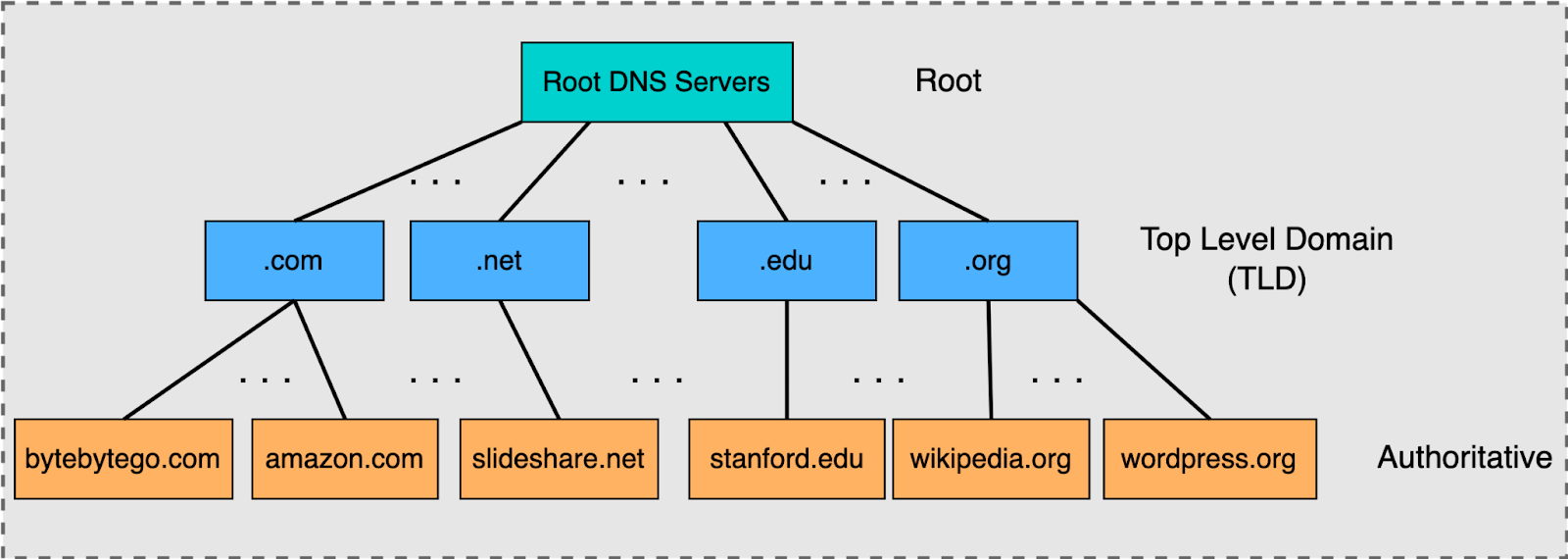
Note : TLD —> (Top-Level Domain) —> It is the last part of a website name.
Examples: —> .com / .in / .org / .net
When DNS looks for a website, It first asks the root server, root server replies like:
“I don’t know the exact IP, but for .com, ask the TLD server.”
TLD server then points to the authoritative DNS server.
Her Authoritative DNS server means the server that actually knows the correct IP of the domain.
Understanding dig . NS — root name servers
This command asks ——> “Who is authoritative for the root of DNS?”
Response lists root name servers like:
a.root-servers.net
b.root-servers.net
The root zone doesn’t store domain IPs
means root server ye nahi batata ki “google.com” ka IP kya hai.It only knows which servers handle which TLDs
root server sirf itna jaanta hai ki kaunsa TLD (jaise.com,.org,.in) kaunsa server handle karta hai.There are multiple root servers globally, replicated using Anycast
Iska matlab hai hum hamesha nearest root server se baat karte hain, isliye DNS fast aur reliable rehta hai.
Understanding dig com NS — TLD name servers
This command solve this:
“Who is responsible for the .com namespace?”
The response lists TLD name servers managed by registries.
Key idea:
.comservers do not know IPs for “google.com”They only know which authoritative servers are responsible for it
This separation keeps DNS scalable and manageable.
Yeh bas direction dete hain, exact answer nahi.
Example:
“Mujhe google.com ka IP nahi pata,
lekin yeh lo, yeh servers hain jo iska final answer de sakte hain.”
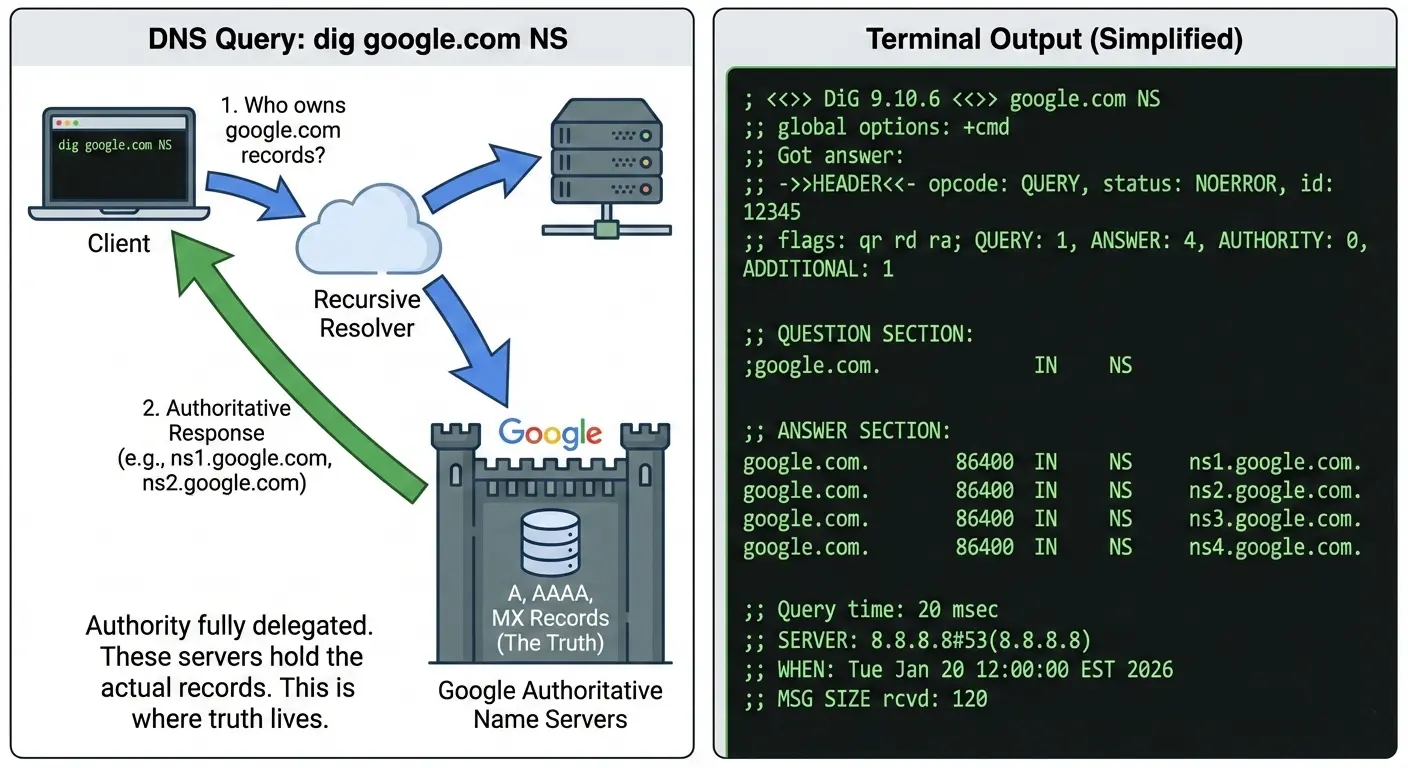
Understanding dig google.com NS — authoritative name servers
dig google.com NS
Now we’re asking ——> “Who owns the DNS records for “google.com“?
Understanding dig google.com — full DNS resolution
dig google.com
This command returns the final answer — IP addresses for “google.com“
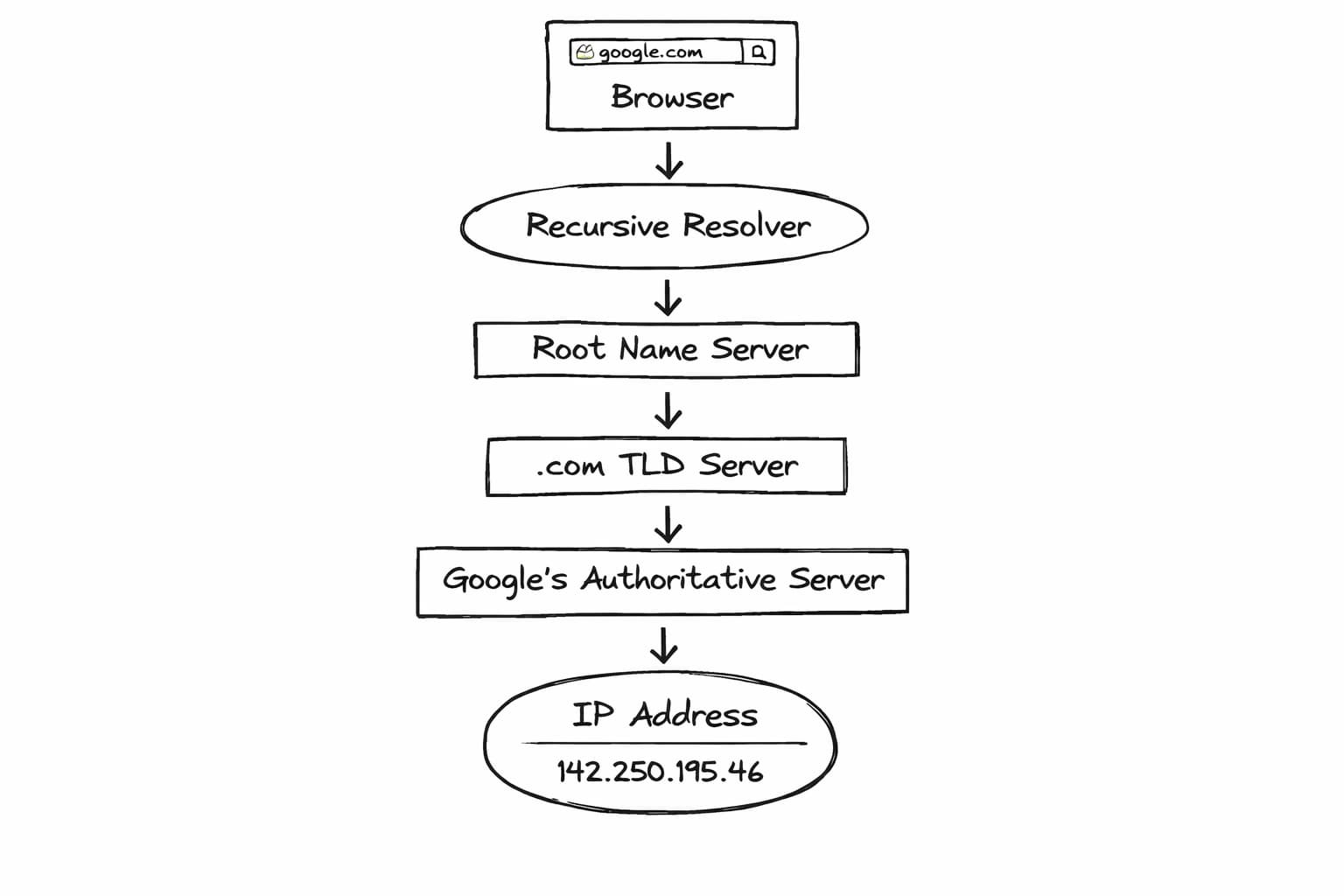
When we type “google.com”, browser doesn't communicate directly with Google's servers. There's a complex journey that takes place first.
Step 1: Recursive resolver ka role ata hai:
Sabse pehle humara system ek recursive resolver ko request karta hai (ISP DNS, Google DNS, Cloudflare DNS) —> “google.com ka IP pata hai kya?“
Step2 - Root servers se poochha jata hai
Resolver root server se poochta hai —> google.com ka IP pata hai kya?
Step3 - .com TLD servers se baat hoti hai
Ab resolver .com TLD server ke paas jata hai aur poochta hai —> google.com ka IP?
TLD Server reponse karta hai —> IP mere paas bhi nahi hai, par google.com ke authoritative servers ye hain.
Direction to milti hai, final answer nahi.
Step 4: Authoritative server final answer deta hai
Ab resolver Google ke authoritative DNS server se poochta hai —> google.com ka IP kya hai?
Yahin se exact answer aata hai aur actual truth mil jata hai.
Step 5: Caching hoti hai
Resolver is answer ko kuch time ke liye cache kar leta hai.
Benefits - next request me root/TLD tak jane ki zarurat nahi / DNS fast hota hai
Step 6: Browser actual connection banata hai
Ab browser ke paas IP aa chuka hota hai. DNS ka kaam khatam.
After this, the TCP connection is established, followed by the TLS handshake, and then the HTTP request is sent.
Connecting dig output to real browser requests
Every HTTP request starts with DNS.
Before TLS
Secure connection (HTTPS / encryption) tabhi start ho sakta hai jab browser ko server ka IP address mil jaye.Before headers.
HTTP headers (User-Agent, Authorization etc.) tab bheje jaate hain jab connection ban chuka ho — aur connection DNS ke baad hi banta hai.Before cookies.
Cookies bhi HTTP headers ka hi part hoti hain, isliye DNS ke baad hi jaati hain.Before APIs.
API call bhi ek HTTP request hi hoti hai. API hit karne se pehle bhi DNS resolve hona zaroori hai.
DNS is the first door of the internet. Agar DNS fail ho gaya, to baaki sab (TLS, headers, cookies, APIs) kabhi start hi nahi honge.
If DNS fails:
websites don’t load
APIs appear “down”
services look broken even when servers are healthy